
Learn How to Earn Home Ed rewards by Referring Friends
If you’re a Strew user on version 1.0.25+ you will see that we’ve added a ‘Refer a Friend’ program. You can now refer your friends to Strew and earn rewards for doing so.
This knowledgebase article explains how Strew’s refer a friend program works:

Strew: Refer a Friend
How do I get to the Refer-a-Friend screen?
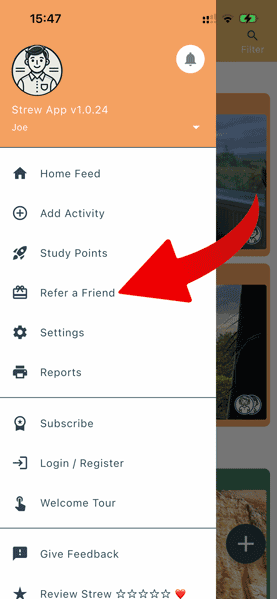
To get to the refer-a-friend screen in Strew, click the menu icon (top left), it looks like this:

Then select “Refer a Friend” from the menu which pops up!
How do I Share to Earn Rewards?
It’s super quick to start earning rewards with the Strew Refer-a-friend program. Here’s how you do it:
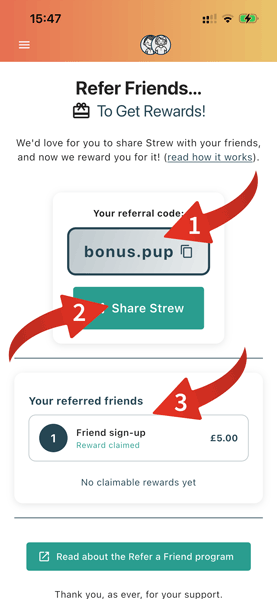
First head into your Strew app and hit ‘Refer a Friend’ from the menu. That’ll show you a screen like the one shown here.
- On your first load the system will invent a referral code for you. This code is unique to you and will be the key to tracking how many friends you’ve referred. (You can tap the ‘copy’ icon if you just want to share your code.)
- Ready to share? Just tap ‘Share Strew’ to use our pre-written message.
- Once a friend signs up, uses Strew a bit, they’ll be presented with a message asking them how they found Strew. All they have to do is choose ‘Referral’ and put your referral code into the box!
… currently the reward is a £/$ 10.00 Amazon voucher per verified sign up. You can read more about the program on the refer a friend page.
Reward Processing
Once you’ve referred a friend or ten, they’ll start showing up in your Strew app under ‘Your referred friends’.
At that point you can leave it to us! As they subscribe we’ll track it and update your referrals through these stages:
- Firstly they show up as ‘unverified’
- Then when they subscribe, they’ll get verified
- Then you can request your vouchers! (Usually processed once a month.)
You’ll be able to see every referral and what stage they’re at via the Strew app.
There’s no limits to referrals, but we ask that you only refer people you know 🙂
For more info please see the frequently asked questions on the Refer a friend page.

If you have any questions, issues with Strew; printing or otherwise, please Contact Us. Likewise if you’d like a knowledgebase article on a specific Strew feature, just let us know!