
Scan and log kids’ books with Strew’s book barcode scanner
Use your phone as a book scanner app: scan the barcode on the back of a book, automatically pull in its title and image, and add it to your child’s learning record in seconds.
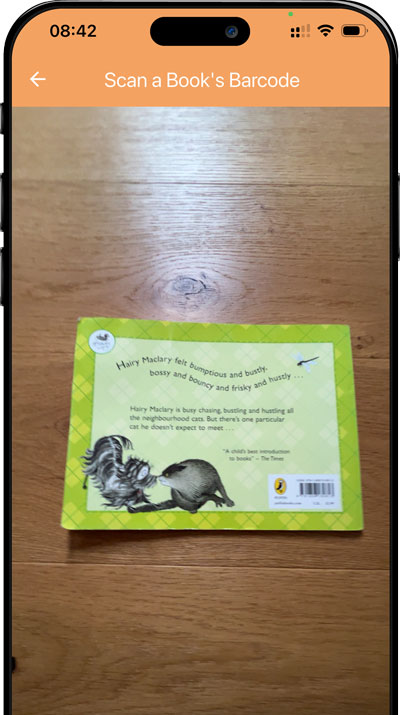
Logging books is useful. Typing every title is not.
If your child reads regularly, manually entering every book quickly becomes repetitive. A book barcode scanner removes most of that admin by letting your phone identify the book for you.
With Strew, simply scan the book barcode with your phone, check the result and save the book to your child’s record.
- Typing book titles by hand is slow, especially when you have several books to add.
- Long titles, author names and book details are easy to mistype.
- Library trips can leave you with a whole stack of books to record at once.
- The more effort recording takes, the easier it is to stop keeping track altogether.
Try Book Barcode Scanner:


Scan the barcode, find the book, save it
Strew turns your phone into a simple book scanning app, so adding books takes seconds rather than another round of typing.
Scan the book barcode
Point your phone camera at the barcode on the back of the book and let Strew scan it.
Strew finds the book
The book title and image are pulled in automatically, so you do not need to enter the details manually.
Add it to your child’s record
Save the book and continue with your day, or connect it to the reading and learning you are already recording in Strew.
When a book scanner saves you time
Whether it is one bedtime story or a stack from the library, scanning is much quicker than entering every book manually.
Scan a stack of library books
Bring home several books? Scan each book barcode rather than typing every title one at a time.
Add a book they are reading
Scan the book your child has started and quickly add it to their record while it is fresh in your mind.
Log a finished book
Scan a completed book and keep it as part of the reading history you are building in Strew.
Why scan books instead of typing them?
A book scanner app takes one of the most repetitive parts of recording reading and makes it almost instant.
Scan instead of typing
Point your camera at the barcode and let Strew do the repetitive part for you.
Pull in the book details
Strew finds the book title and image automatically after you scan the barcode.
No separate book scanner needed
The barcode scanner for books is built into Strew and works through your phone camera.
Turn a scan into a useful record
Once a book is added, it can become part of your child’s wider reading and home education record.
Made for families with a lot of books
If books are a regular part of your child’s learning, Strew gives you a faster way to get them into your records.
- Home educating families who regularly record books and reading.
- Parents who want a simple book scanner app on their phone.
- Families who borrow stacks of books from the library.
- Anyone tired of manually entering book titles into reading records.
How does Strew’s book barcode scanner work?
Strew includes a book barcode scanner designed to make adding children’s books quick and simple.
Instead of typing the title manually, scan the barcode on the back of the book using your phone camera. Strew looks up the book and pulls in its title and image, ready for you to save to your child’s record.
For most modern books, the barcode on the back contains the book’s ISBN, which is what allows a book or ISBN scanner to identify the correct title.
- Scan book barcodes directly with your phone camera.
- Automatically retrieve the book title and cover image.
- Use Strew as a quick book scanning app without separate hardware.
- Works well for picture books, chapter books and books borrowed from the library.
- Save scanned books as part of your child’s wider learning and reading record.
Scanning the book is just the beginning
Once you have scanned a book, Strew can help you keep it as part of a longer-term reading record. Your child’s Bookshelf keeps books they want to read, are currently reading and have finished together in one visual place.
Want to track everything they read? See: Reading Log for Kids & Bookshelf or learn more about home education evidence of learning.
Related features
Scanning gets the book into Strew quickly. These features help you turn it into a useful reading and learning record.
Scan books instead of typing them
Use your phone to scan the barcode, find the book and add it to your child’s record in seconds.

Frequently asked questions
Common questions about scanning book barcodes and using Strew as a book scanner app.
What is a book barcode scanner?
A book barcode scanner uses a camera to read the barcode on a book and identify the book automatically. In Strew, you can scan the barcode with your phone and pull in the book title and image without typing them manually.
Can I scan a book barcode with my phone?
Yes. Strew uses your phone camera as a barcode scanner for books, letting you scan the barcode on the back of a book and quickly add it to your child’s record.
Can Strew be used as a book scanner app?
Yes. Strew includes a book scanner inside the app, so you can scan children’s books, retrieve their details and add them to your child’s reading and learning records.
Can Strew be used as an ISBN scanner?
Most modern books have an ISBN encoded in the barcode on the back. Strew scans this book barcode and uses it to find the corresponding book details, making it useful as a simple ISBN scanner for recording children’s books.
Can I scan library books with Strew?
Yes, as long as the book has a standard book barcode that Strew can identify. This makes the scanner particularly useful after library trips when you have several books to add at once.