
Export your home education records when you need them
Keep your records organised in Strew, and export a clear summary for backup, sharing, or your own review. No scrambling, no copying and pasting. Just easy home ed reports.
Records are only useful if you can share or back them up
Most systems fall apart at the moment you need an overview. Exporting should be a button, not a project.
Strew helps you keep a tidy record day-to-day, then export it cleanly when you need it.
- Copying notes from different places takes hours.
- Photos and notes don’t stay together.
- Formatting nicely can be surprisingly hard.
- You worry about losing your records.
Try Export Learning Records:


Export from the record you’ve already built
Log first. Export later. Keep it simple.
Strew makes it all super easy.
Log learning as normal
Notes, photos, and tags become your record.
Choose what to include
Pick a date range and the child/children.
Export a clear overview
Use it for backup, sharing, or reflection.
Examples of what you might export
Different moments call for different outputs.
A quarterly overview
Highlights, themes, and examples across the quarter.
A portfolio-style selection
Curated entries and photos that show progress. e.g. Show all the art your child has made.
A “recent learning” snapshot
Quick proof of what you’ve been doing lately.
Why exporting from Strewis reassuring
Strew is designed to be privacy first. All of your data stays on your device. Printing and sharing pdf’s let you selectively share your child’s learning with others.
Keep a copy of your records
Peace of mind that your learning record is safe.
Provide a clear summary
Readable output without manual formatting.
Create a portfolio of work faster
Keep photos and notes together. Optionally export by topic.
Reflect and plan
Reports help you look back and adjust direction.
For anyone who wants privacy, reassurance and selective sharing
Exports are useful even if you never share them with anyone else.
- Parents who like keeping backups.
- Children building portfolios over time.
- Parents who do monthly/quarterly/yearly reviews.
- UK families who want the option of clear summaries.
What can you export from Strew?
Built for real-life use. We build Strew to be feature-rich yet easy to use. From Strew you can easily export:
- Notes, tags, and selected examples.
- Photos with context.
- Learning Insights.
- Export/share-friendly pdf formatting.
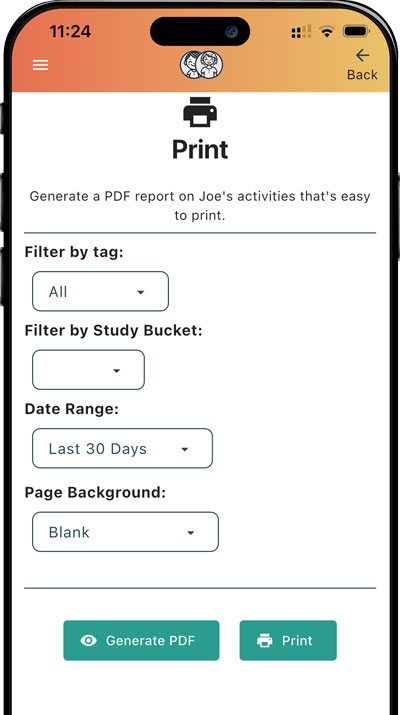
- Filter by child, tag, study points, or date range.
If you need a clear overview, exporting helps
Strew reports can support calm record keeping, a clear summary built from everyday logs. It makes it easier if you ever need supporting documentation for local authorities or other organisations.
Want more detail? See: Evidence of learning in home education and Home education law (UK).
Related features
Exports are strongest when your logging is consistent.
Build your record once, export anytime
Log little and often, then export a report whenever you need it.

Frequently asked questions
Common questions about exporting home education records, reports and learning portfolios from Strew.
Can I export my home education records as a PDF?
Yes. Strew lets you turn the learning records you have already logged into a clear, share-friendly PDF report without manually copying and formatting everything yourself.
What can I include in a Strew home education report?
You can include learning notes, photos, tags, Learning Insights and selected examples from your child’s record, helping you create a clear overview of their learning.
Can I choose which learning records to export?
Yes. Strew lets you filter records by child, date range, tags and Study Points, so you can create anything from a recent learning snapshot to a longer-term home education report.
Can I create a home education portfolio with Strew?
Yes. You can use Strew to build a learning portfolio containing selected activities, photos and notes, then export those records when you want a clearer overview of your child’s work and progress.
Can Strew reports be used when sharing information with a local authority?
Strew can help you organise and export a clear summary of your child’s home education, including examples of learning and supporting records. This can make it easier to prepare documentation if you choose or need to share information with a local authority or another organisation.
Is there a home education report template I can use?
Yes. If you want a starting structure before creating your own report, see our free home education report template. It includes suggested sections for learning, evidence, progress and future plans, with downloadable PDF, Word and Google Docs versions.
Can I see examples of home education reports?
Yes. Our home education report examples show how completed reports can be structured and how learning activities, progress and evidence can be presented clearly.
Should I use a template or generate a report from my learning records?
Both approaches can work. A home education report template gives you a useful structure, while Strew lets you build a report from activities, photos and learning records you have already saved throughout the year.
What does a finished home education report look like?
There is no single required format, so reports can look quite different depending on the family and educational approach. You can browse our home education report examples to see several ways of presenting learning, progress and supporting evidence.