
Learn How to Add a Childrens book to Strew with it’s ISBN
One of our most popular features is the Strew reading log, and many of you have been building fantastic book piles on your virtual bookshelves, for your children.
Sometimes books don’t have a barcode, or it’s not easy to get a picture of it. This guide explains how to add a book by ISBN code (usually the numbers along the barcode), when the kids book scanner doesn’t work.
Further, you can read how to get in touch when a book is stubbornly not scanning!

Adding a Children’s Book by ISBN
Where to go to Add a Book to Strew
You can add as many children’s book to Strew as you want. Strew creates your own virtual bookshelf for each child!
To get started you can add a book one of 2 ways:
1. Add Book when adding an activity
When in Strew tap the ‘+’ button on the bottom right of your screen, (or select ‘Add Activity’ from the side menu).
From the Add Activity screen select ‘Scan’ or ” under Books:
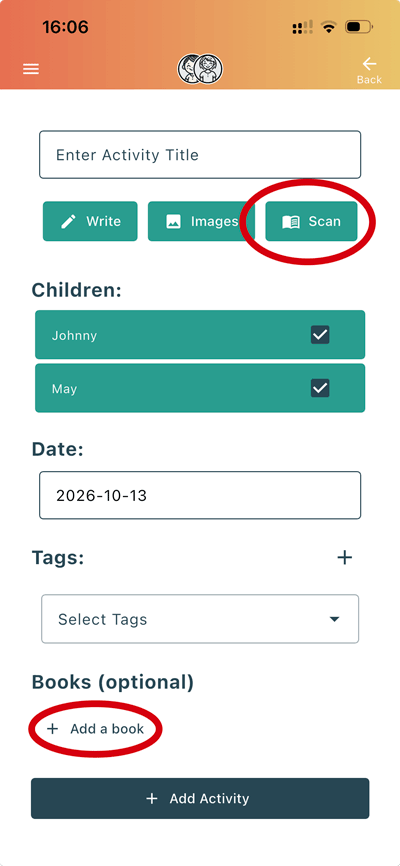
This lets you add a book which directly relates to the added activity, (see below for how to then add via ISBN).
2. Add book from your child’s bookshelf
When in Strew, select ‘Bookshelf’ from the side menu, then tap ‘+ Add Book’ from the bottom right of the screen:
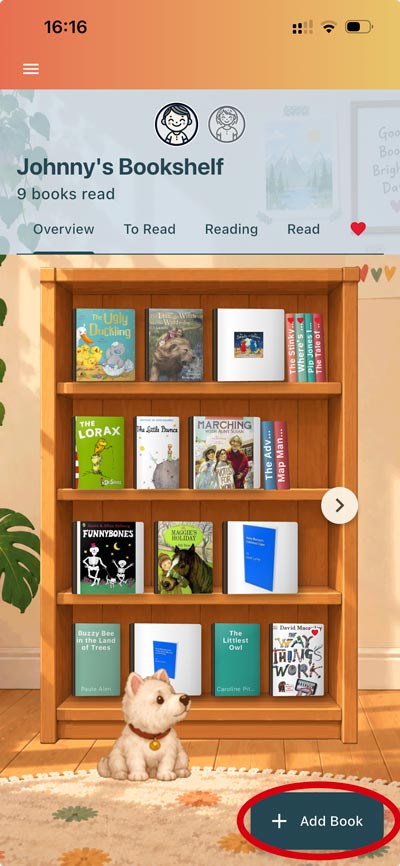
Adding a Book via ISBN number
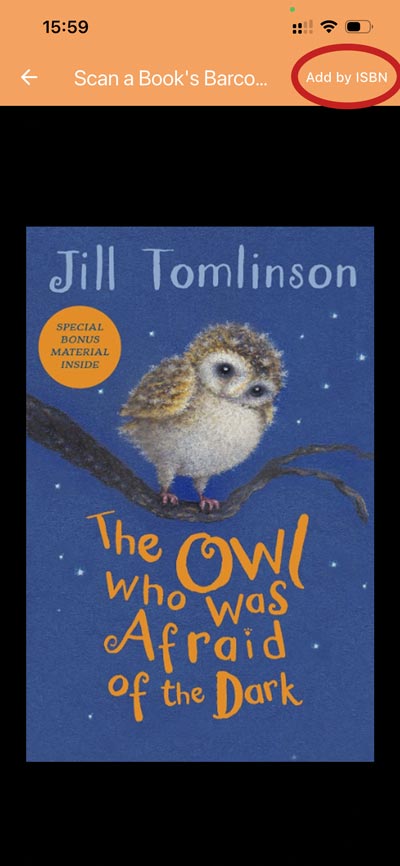
Once you’re on the ‘Scan Children’s Book Barcode’ screen (via one of the two routes above), it’s simple to add a book via ISBN (if the barcode scanner doesn’t detect it):
1. Tap ‘Add by ISBN’ (it’s on the top right of the scanner screen):
2. Next simply type in the ISBN in the box which pops up:
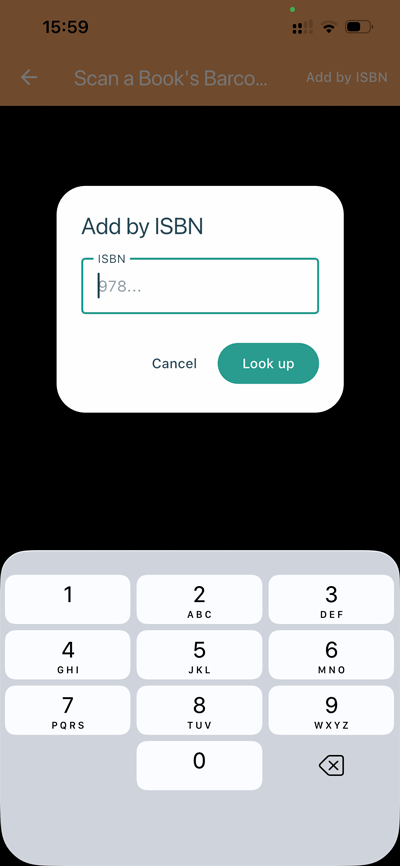
3. Then hit ‘Look Up’. If the book doesn’t get found it may be out of print/not in our ISBN service database, (see ‘Books which Strew can’t find below).
Books which Strew can’t find
Currently we use one of the market leaders ISBN database, so Strew should find most children’s books. Sometimes though, this database has inaccurate data, or misses the odd book. We’re still working on how best to serve you when this happens.
If you do get a book that won’t scan, please do contact us and let us know the book – we’ll then get it added or investigate why it hasn’t shown up.

If you have any questions, issues with Strew; printing or otherwise, please Contact Us. Likewise if you’d like a knowledgebase article on a specific Strew feature, just let us know!