
Tag learning by subject or your child’s interests, without forcing your day into boxes
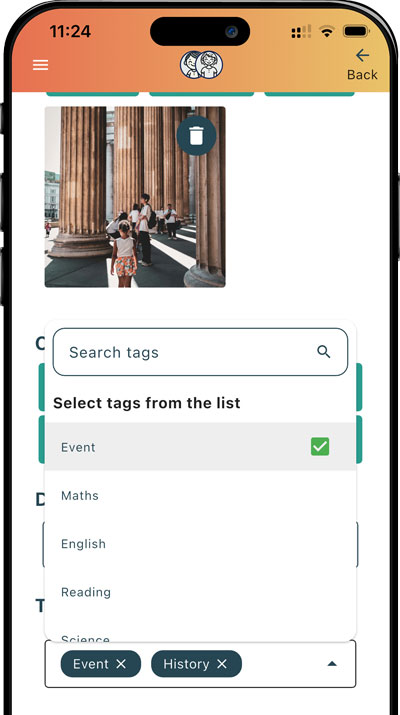
Use flexible tags like Maths, Reading, Wellbeing, or anything you choose. Tags make it easier to review, summarise, and spot patterns.
When everything is “just life”, it’s hard to review learning
Child-led learning is real learning, but it can be difficult to summarise without some organisation.
Tags give you just enough structure to review learning, without changing how you homeschool.
- You can’t easily answer “what have we been focusing on?”
- Reviewing becomes slow without filters.
- It’s hard to balance areas you care about.
- Summaries and reports take longer than they should.
Try Activity Tagging:


Tag lightly, then benefit later
You don’t need perfect tags, you just need consistent-ish ones.
Pick a couple of tags
Add 1–3 tags that feel right (subject or skill).
Keep tags flexible
Use your own approach: skills, themes, “school” subjects, or values.
Review by tag when you need to
Later, tags help you summarise quickly and spot patterns.
Tagging examples
Here are simple tagging patterns that work well for our home educating parents
“Baking bread”
A single activity can cover multiple areas, but also be tagged: “baking”
“Nature walk journalling”
Tags help you notice repeated interests, and group activities by that interest
“Minecraft redstone experiment”
Skills-based tags can also be more meaningful than subjects
Why tagging is worth it
A tiny bit of organisation goes a long way.
Summarise in minutes
Tags make it easier to pull together a clear overview.
Notice interests and threads
Repeated tags show what your child is drawn to.
Keep an eye on areas you care about
Without turning your home ed into a timetable.
Cleaner reports and summaries
Tags help your reports feel organised and clear.
Ideal for families who want “light structure”
Tagging is optional, but powerful if you want to look back on your child’s learning over time.
- Unschoolers who want a gentle way to summarise learning.
- Structured homeschoolers tracking subjects consistently.
- Parents who want quicker reports and summaries.
- Families tracking multiple children and themes.
What you can tag
Use whatever categorisation makes sense to you.
- Skills (problem solving, teamwork, independence).
- Themes (nature study, projects, trips).
- Values (wellbeing, resilience, curiosity).
- “Traditional” Subjects (Maths, Science, History, etc.).
- Custom tags that fit your family.
Helpful for clearer learning summaries (reports)
If you ever need to describe what learning has covered, tags add extra weight and clarity to your proof of learning.
Want more detail? See: Evidence of learning in home education and Home education law (UK).
Related features
Tagging works best alongside these.
Make reviews quicker with simple tags
Tag lightly now, and thank yourself later when it’s time to review or summarise.

Frequently asked questions
Common questions about using tags to organise and review home education activities in Strew.
How can I organise home education activities by subject or skill?
Strew lets you add flexible tags to learning activities, so you can organise records by subjects, skills, themes, interests or anything else that makes sense for your family.
Can I add more than one tag to a learning activity?
Yes. One activity can have several tags, which is useful when learning crosses different areas. For example, baking could be tagged with Maths, Science and Life Skills.
Can I create my own custom learning tags?
Yes. You can use your own tags for subjects, interests, skills, projects, values or themes, rather than being limited to a fixed set of school-style categories.
Are activity tags useful for unschooling or child-led learning?
Yes. Tags can give child-led or unschooling records a little structure without changing how your child learns. They make it easier to look back and notice recurring interests, skills and learning themes over time.
Can activity tags help with home education reports?
Yes. Tags make it easier to group and review related learning when you are preparing a summary or report, helping you quickly see what subjects, skills or themes have been covered.