
Quickly log kids’ books by scanning the barcode
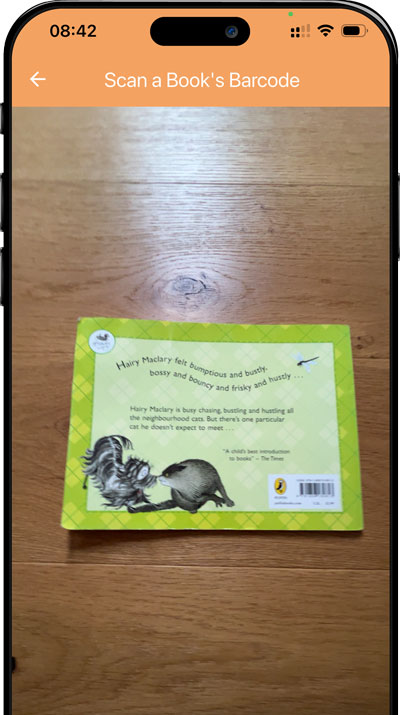
Strew’s Book Barcode Scanner makes reading logs effortless: scan the barcode on a book, pull in the title and image instantly, and save it to your child’s reading record in seconds.
Reading records are useful, but typing every book gets old fast
If your child reads often, logging books manually becomes one more job to remember. That means reading history gets patchy, favourite books get forgotten, and it’s harder to see progress over time.
The Book Barcode Scanner removes the friction: scan the book, save the entry, and keep a clear reading record without extra admin.
- Typing titles and authors every time is slow and repetitive.
- You forget which books were read last week or last month.
- Shared reading, rereads, and library books are easy to lose track of.
- Building a reading record sounds nice in theory, but feels fiddly in practice.
Download Strew:


Scan, confirm, save
The scanner is built for busy families who want a reading log that’s actually quick enough to keep up.
Scan the barcode on the book
Use your phone camera to scan the barcode in seconds.
Check the book details
Strew pulls in the title so you don’t have to type it out manually.
Save it to the reading log
Add a note if you want, then keep moving with your day.
Examples of how families use the scanner
It works whether you are logging bedtime stories, independent reading, or library hauls.
Bedtime story logging
Scan the picture book after reading and add it to your child’s timeline.
Independent reading history
Quickly build a list of chapter books your child has worked through.
Library trip catch-up
Scan a stack of borrowed books so you remember what interested them this month.
Why parents love the barcode scanner
It makes recording your childs reading super fast and easy!
Skip manual typing
Scanning is much faster than entering every book by hand.
See what your child has read
A clear record helps you notice favourites, rereads, and growing confidence.
Spot reading habits over time
Small reading moments add up when they are actually logged.
Keep it simple or add notes
Log the book alone, or add thoughts, reactions, and reading details.
Perfect for families who read a lot
If books are a big part of the way you do home education, the Strew Book Barcode Scanner helps you keep a record without turning reading into admin.
- Parents logging bedtime stories and shared reading.
- Children building independent reading habits.
- Families who borrow lots of library books.
- Anyone who wants an easier way to track literacy over time.
How does the Book Barcode Scanner work in Strew?
The Book Barcode Scanner is a simple shortcut built into the “create activity” screen.
Instead of typing book titles manually, you scan the barcode on the back of the book. Strew then pulls in the book title and image, then lets you save it straight to your child’s learning record. You can keep it as a quick book log, or add notes about who read it, whether it was a reread, and any thoughts about the book.
- Scan book barcodes with your phone camera inside Strew.
- Pull in book titles and images for faster reading logs.
- Add optional notes about reading level, reactions, or shared reading.
- Works for picture books, chapter books, and library books.
- Build a clearer literacy record over time with less effort.
Reading logs are small records that add up
A book scan on its own is simple, but over time it helps create a useful reading history. That can support literacy tracking, reflection, and a fuller picture of your child’s home education.
Want more detail? See: Evidence of learning in home education and Home education law (UK).
Related features
The barcode scanner works best as part of a simple reading and learning log.
Make reading logs effortless
Scan the barcode, save the book, and build a reading record your family will actually keep up with.
